
Bulk Import Entra ID Users
In this guide, you will learn how to bulk import Entra ID users from a CSV file with the 365 Pro Toolkit.
Requirements
Section titled “Requirements”The following columns in the CSV are required to create an account.
- UserPrincipalName
- mailNickName
- DisplayName
- AccountEnabled
How to
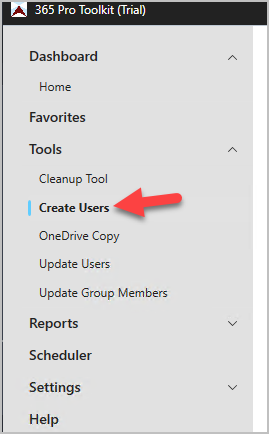
Section titled “How to”Step 1. Click on Tools > Create Users
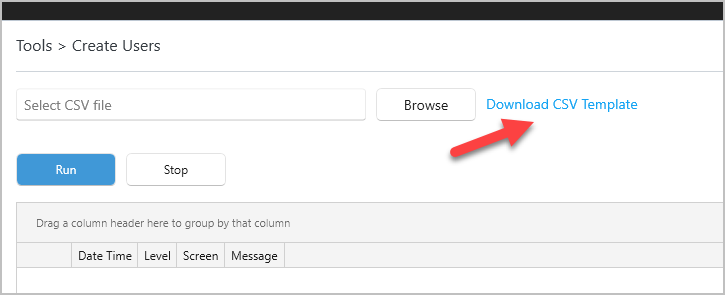
Step 2. Click on “Download CSV Template” to download the needed CSV Template.
Step 3. Open your template and fill out the user information.
These columns are required, all other columns are optional.
- UserPrincipalName
- mailNickName
- DisplayName
- AccountEnabled (TRUE or FALSE)
Step 4. Select Template and Run
The tool will output the results to the screen. Any accounts that have an error will display an error along with the message. You can see in the screenshot above a few accounts did not create because the UPN already exists. These logs are also stored to a log file.
CSV Columns
Section titled “CSV Columns”Below is a list of columns included in the template.
| Column Name | Description |
|---|---|
| FirstName | First name of the user |
| LastName | Last name of the user |
| UserPrincipalName | The user’s sign-in name (UPN) |
| DisplayName | Full display name shown in the directory |
| Password | Initial user password |
| ForceChangePasswordNextSignIn | Whether the user must reset password on next login |
| MailNickname | Alias used for email |
| AccountEnabled | Indicates if the account is active |
| JobTitle | User’s job position |
| Department | Department the user belongs to |
| EmployeeID | Employee identification number |
| OfficeLocation | Office or site location |
| Manager | Manager’s name or ID |
| StreetAddress | Street address of the user or office |
| City | City for address |
| State | State or province |
| PostalCode | ZIP or postal code |
| Country | Country or region |
| BusinessPhone | User’s business phone number |
| MobilePhone | User’s mobile phone number |
| UsageLocation | Location used for licensing and compliance |