Enable LDAPS
The AD Pro Toolkit support LDAPS port 636.
LDAPS (port 636) refers to LDAP over SSL/TLS—a secure, encrypted version of the Lightweight Directory Access Protocol (LDAP). It’s commonly used to securely communicate with Active Directory Domain Services (AD DS) or other LDAP directories.
Enable LDAPS
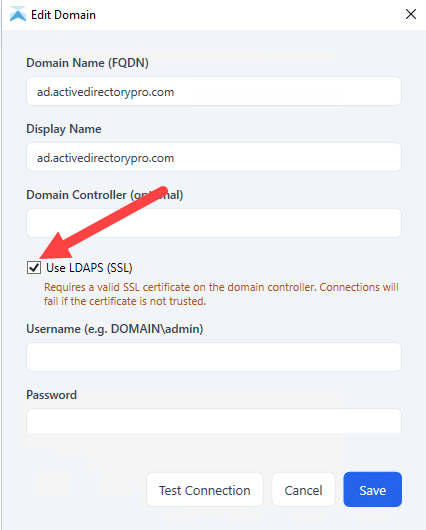
Section titled “Enable LDAPS”- Click Settings > Domain Settings
- Edit your connection and select “Use LDAPS”
- Click Save
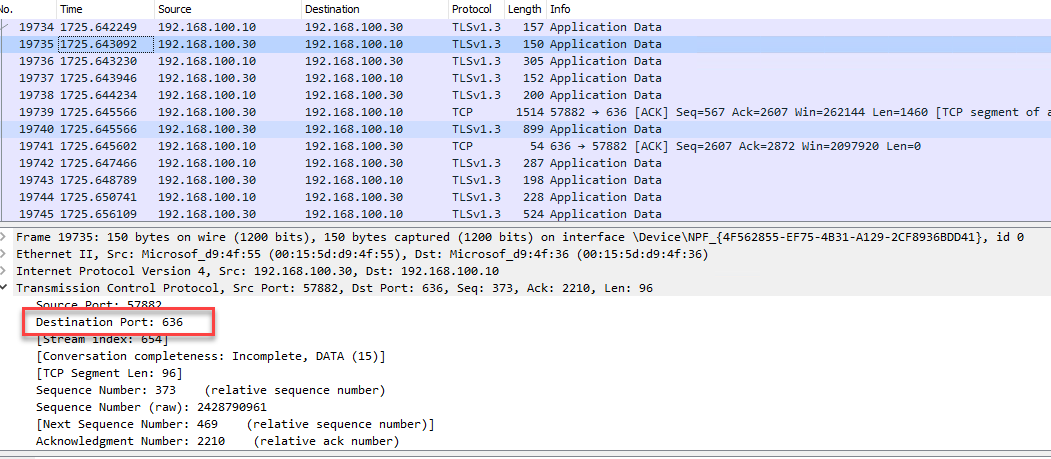
Here is a wireshark screen to verify the traffic from the AD Pro Toolkit to the domain controller is now using port 636.