How to Offboard Users in Active Directory
In this guide, you will learn how to offboard users in Active Directory using the AD Pro Toolkit. Streamline the process by disabling accounts, removing group memberships, and moving users to a designated OU.
How to Offboard Active Directory Users
Section titled “How to Offboard Active Directory Users”Step 1. Click on Tools > Users > Offboard Users
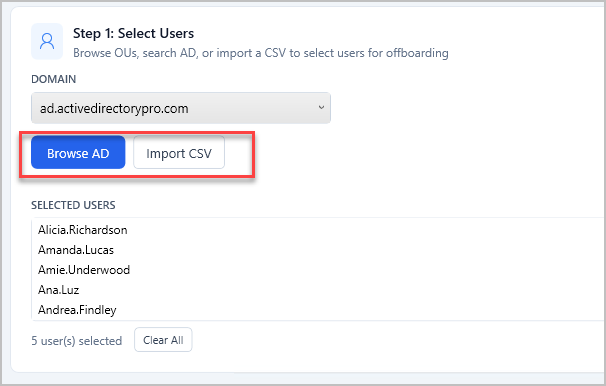
Step 2. Click “Browse AD” to select users or use a CSV list.
Step 3. Select Offboard Options
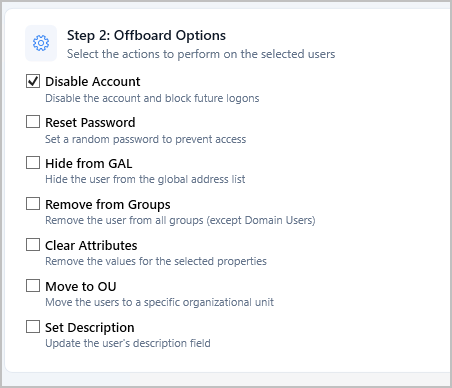
List of options
Section titled “List of options”| Option | Description |
|---|---|
| Disable Account | Disables the account to block future logons (checked by default) |
| Reset Password | Sets a random password to prevent access with the old password |
| Hide from GAL | Hides the user from the Global Address List (Exchange) |
| Remove from Groups | Removes the user from all groups except Domain Users |
| Clear Attributes | Clears selected properties: Manager, E-mail, Telephone, Mobile, Fax, IP Phone |
| Move to OU | Moves the user to a specified OU (e.g. “Disabled Users” OU) |
| Set Description | Updates the description field (supports {date} and {user} placeholders) |
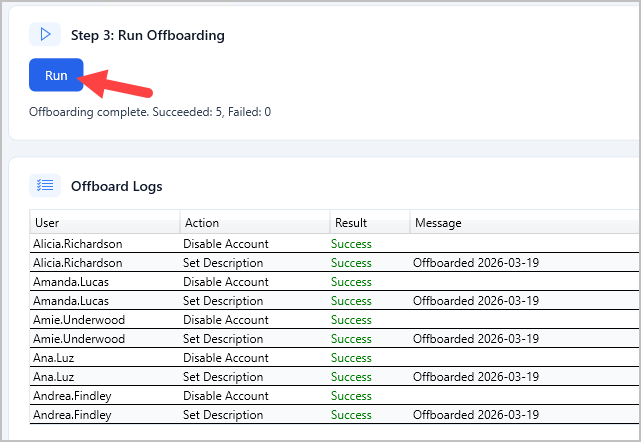
Step 4. Click Run
Click the “Run” button to start the offboard process. You will get a log of the completed actions.
CSV Example
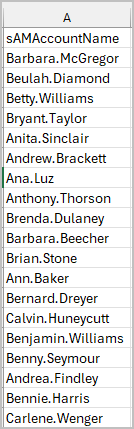
Section titled “CSV Example”To offboard from a CSV list you just need the users sAMAcountName (logon name)