
Troubleshooting
Uninstall or Upgrade Issue
Section titled “Uninstall or Upgrade Issue”If you are unable to uninstall or upgrade, follow these steps.
-
Download the Microsoft Troubleshooter Tool. This tool will uninstall programs that have an issue.
-
Make sure these folders are deleted
- C:\Program Files\ActiveDirectoryPro
- C:\ProgramData\ActiveDirectoryPro
-
Make sure the AD Toolkit Windows service is deleted, if not open the command prompt and run the following command.
- sc delete ADToolkitService
You should now be able to install the latest version.
License Activation issues
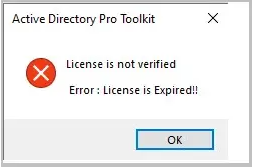
Section titled “License Activation issues”Error: License is not verified
Solution
This is typically due to a corrupted license file.
- Close the app
- Delete the “license.dat” file from this folder C:\ProgramData\ActiveDirectoryPro\AD Pro Toolkit
- Try to activate again.
If the above steps do not resolve the issue, contact support for a new license file.
Connection Issues
Section titled “Connection Issues”Unable to Connect – The RPC server is unavailable (HRESULT: 0x800706BA)
Section titled “Unable to Connect – The RPC server is unavailable (HRESULT: 0x800706BA)”Solution:
This is typically a firewall issue. Verify WMI is allowed inbound on the target computers.
Unable to Connect – The RPC server is unavailable.
Section titled “Unable to Connect – The RPC server is unavailable.”Solution:
The computer is offline or unreachable. Verify the computer is online and can be reached by your computer.
Unable to Connect – Access is denied
Section titled “Unable to Connect – Access is denied”Solution
This error can occur due to the following.
- The computer has lost its trust relationship with Active Directory
- You do not have administrator rights
- Run as administrator (UAC) – If you are logged into the computer as a regular user you might need to right click on the toolkit and select run as administrator.
Verify WMI is Allowed
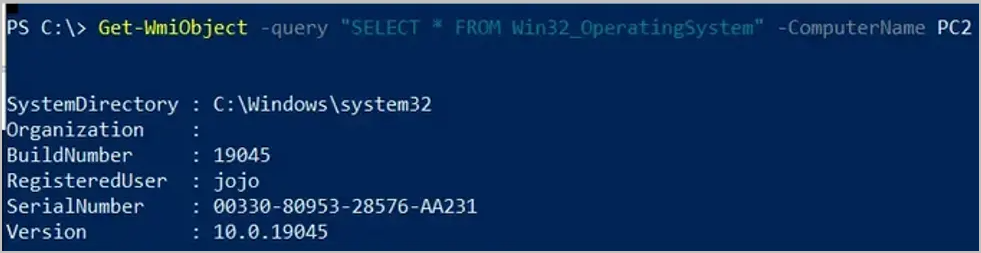
Section titled “Verify WMI is Allowed”Use the following command to test the WMI connection from your local computer (that has the AD Pro Toolkit installed) to the remote computer. Replace PC2 with the remote computer hostname.
Get-WmiObject -query "SELECT \* FROM Win32_OperatingSystem" -ComputerName PC2If the connection is successful, you will get a message like below.
If WMI is being blocked, you will get a message like below.
