
Group Policy Reports
Description
Section titled “Description”The built-in group policy reports provides comprehensive visibility into all Group Policy Objects (GPOs) across your Active Directory environment. It automates the discovery and analysis of GPO configurations, links, enforcement settings, filtering rules, and lifecycle changes to help administrators maintain a secure and well-organized Group Policy infrastructure.
How to run GPO Reports
Section titled “How to run GPO Reports”- Click Reports > GPO Reports
- Select a report and click the “Run” button
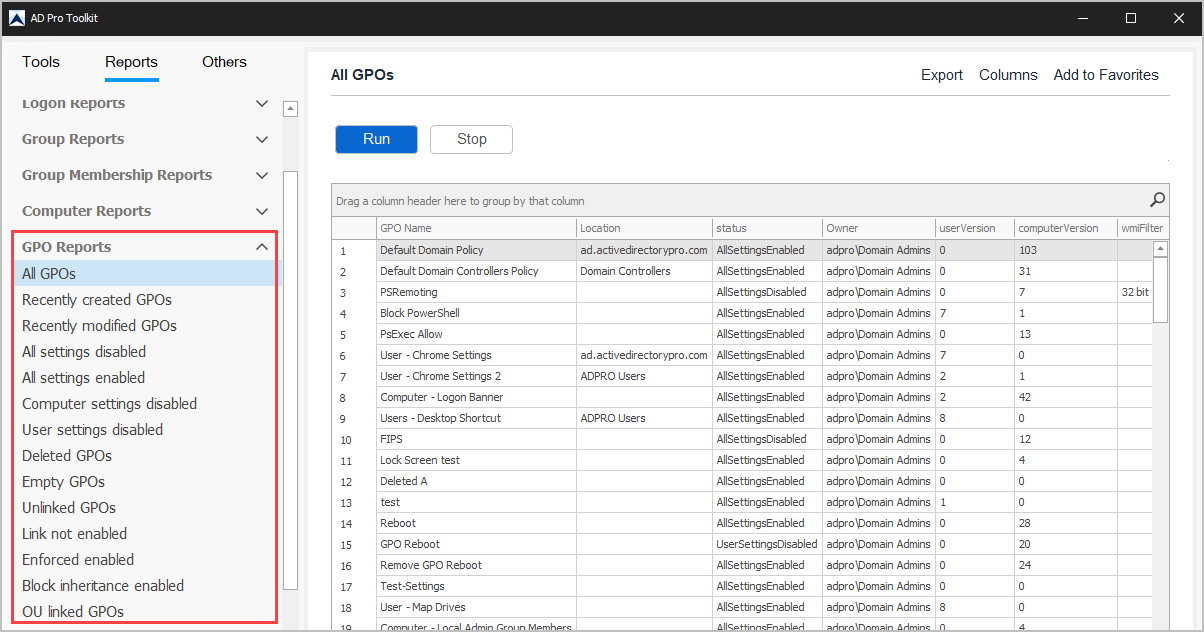
List of GPO Reports
Section titled “List of GPO Reports”| GPO Reports | Description |
|---|---|
| All GPOs | List all GPOs and where they are linked |
| Recently created GPOs | List recently created GPO objects |
| Recently modified GPOs | List recently modified GPO objects |
| All settings disabled | GPO status is set to “All settings disabled” |
| All settings enabled | GPO status is set to “Enabled” |
| Computer settings disabled | GPO status is set to “Computer configuration settings disabled” |
| User settings disabled | GPO status is set to “User conifuration settings disabled” |
| Deleted GPOs | List recently deleted GPOs |
| Empty GPOs | List GPOs with no policy settings |
| Unlinked GPOs | List GPOs that are not in use |
| Link not enabled | List GPOs that are linked and their location |
| Enforced enabled | List GPOs with Enforced enabled |
| Block inheritance enabled | OUs with block inheritance enabled |
| OU linked GPOs | List GPOs that are linked to an OU |
| Site linked GPOs | List GPOs that are linked to a site |
| Domain linked GPOs | List GPOs that are linked to the domain |
| GPOs and security filtering | Not sure what this report is currently showing? |
| GPOs and WMI filtering | List GPOs that have WMI filtering configured |