Active Directory Lockout Troubleshooter
Description
Section titled “Description”This tool collects the logout events from all domain controllers to help you track down the source of accounts lockouts.
Features
Section titled “Features”- Find user lockout source computer
- Easily display all lockout events from all domain controllers
- Show failed authentication attempts
- Check lockout time
Requirements
Section titled “Requirements”- Your account needs access to read the event controller logs.
- You can grant Non-Admins read only access to the event logs by adding them “Event Log Readers” Active Directory group.
How to
Section titled “How to”Step 1. Select Date Range
Note: If you have a lot of users this tool can pull back a lot of logs. Its best to limit the date range close to the lockout time if you can.
Step 2. Click “Run”.
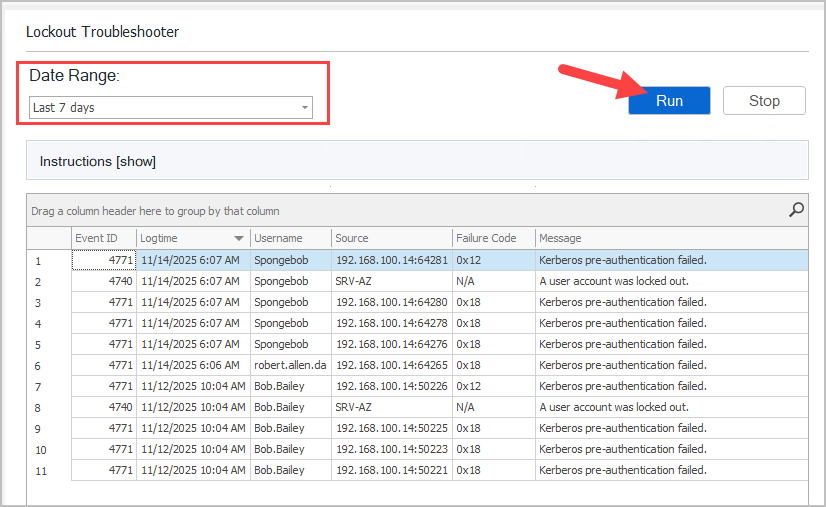
Step 3. Revier the results
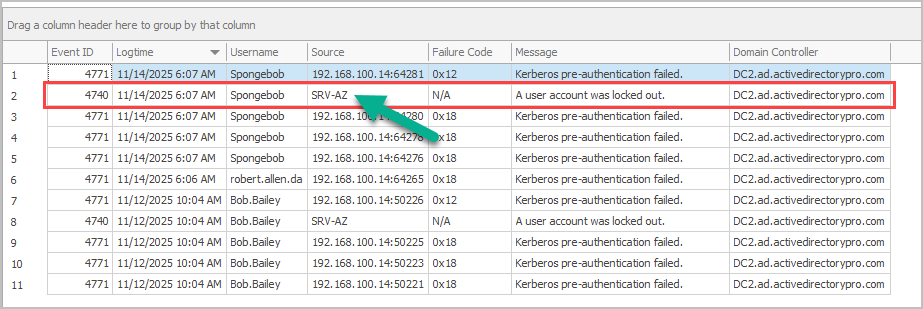
- Event ID
- Event ID: 4771 or 4740
- logtime: The time the event occured on the domain controller
- Username: The username for the event
- Source: This is the source of the lockout or the authentication failure
- Failure Code
- Message:
- Domain Controller: The DC the event occured on
For example, you can see the spongebob account was locked out on 11/14 on computer srv-az.